


Zora - Music Player
4.66.00 Reviews
App Specs
- Version
- 1.1.2
- Updated On
- License
- Free
- Downloads
- 10,000+
- Developer
- THREESIDE PEPTIDES
- Categories
- Music & Audio
- Platform
- Android
Screenshots
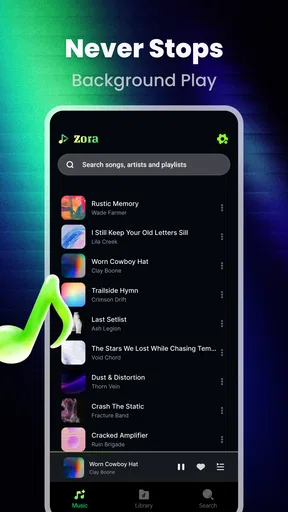
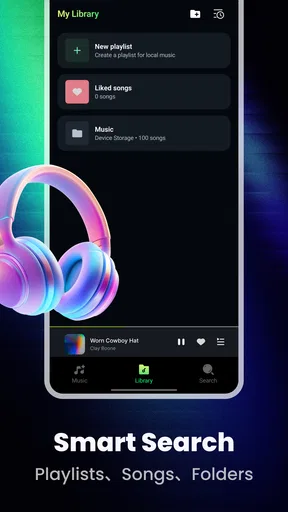
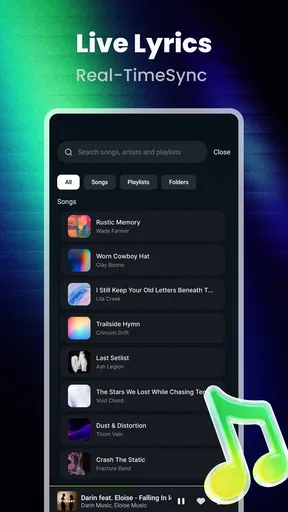
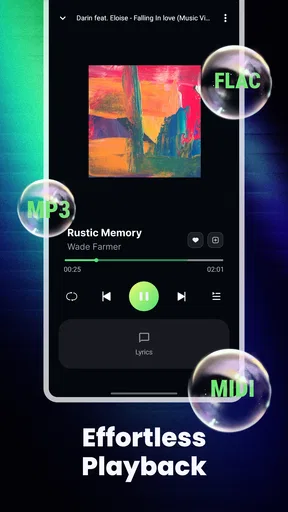
 Analysis by AppCompare
I approached Zora as a practical question rather than a catalog exercise: what does a free local music player add when a phone already has streaming services, a file manager, and perhaps a built-in audio app? The answer is more focused than flashy. This Music & Audio app is aimed at listeners who keep their own tracks and want a dedicated place to play them, instead of treating personal files as an afterthought.
That distinction matters. A streaming service is built around discovery, subscriptions, recommendations, and an online library. Zora starts from a different assumption: your music is already yours, and the app should help you listen to it. In my experience, that makes its appeal strongest for people with downloaded albums, recordings, offline collections, or music transferred from another device.
It is free to use, carries an Everyone age rating, and comes from THREESIDE PEPTIDES. The current release is version 1.1.2, with support beginning at Android 8.0. Those details make it approachable for a broad range of Android users, although the real question is not whether it is easy to obtain. It is whether your listening habits are local-first enough to justify adding another player.
How Zora fits into everyday listening
I find Zora most useful when it has a clear role: a straightforward place for the music files I’ve chosen to keep on my phone, alongside whatever I use for streaming or discovery. That separation can make an everyday routine simpler, especially when I want to play a known album without first deciding what a service recommends. From there, the next question is how its current release fits into that focused job.
A local-first alternative to streaming apps
The most useful way to understand Zora is to see it as a home for music files you already control. That can include an album copied to your phone for a trip, a personal collection kept on internal storage, or tracks that do not belong to a commercial streaming catalog. Instead of asking you to search an online service, it puts the emphasis on playback from your own library.
That approach immediately changes the workflow. With streaming, I usually begin by opening an app, waiting for the service to load, and navigating through playlists or recommendations. With a local player, the important preparation happens earlier: the files need to be on the device and organized well enough to find. Zora is valuable after that preparation, because it gives those files a music-focused destination rather than leaving them mixed in with downloads and documents.
This is also why the app will not suit everyone. If nearly all your listening comes from Spotify, YouTube Music, Apple Music, or another online platform, Zora is not a replacement for those services. It does not make an online catalog appear on your phone simply because you install a local player. Its purpose is narrower, and that narrowness is part of its appeal.
Worth Reading Before You Choose

Flipboard Shows What News Apps Must Do Beyond the Feed

Switching to Android Auto Means Rethinking Your Driving Routine

Google Calendar Makes a Crowded Week Easier to Manage

Ludo King Makes the Most of the Minutes Between Plans

Baby Panda World Brings Quick Play to Modern Phones, but Its Game Library Feels Busy

ESPN’s Live Game View Makes Following Close Games Easier
What the free price means in practice
There is no purchase cost attached to using Zora, so the value calculation is straightforward: you can try it without committing money. That makes experimentation sensible for anyone who already has music stored locally. You do not need to decide whether a subscription is worth keeping, and you are not paying for access to an online catalog you may barely use.
Free access should still be judged by usefulness, not by the word “free” alone. An app that does not match your library is not valuable just because it costs nothing. For a local listener, though, the lack of an upfront price lowers the risk considerably. I would install it when I had a specific collection to test, rather than downloading it with the expectation that it would replace every audio service on my phone.
The listed average is 4.7 from around one hundred forty ratings, and the app has passed ten thousand installs. Those figures suggest that Zora has found an audience, but they should not be treated as proof that it fits every music setup. A local player can feel excellent to someone with carefully stored albums and unnecessary to someone whose library lives entirely in the cloud.
The first setup decision is your file organization
One of the less obvious lessons with a local player is that the app cannot completely rescue a disorganized collection. If files have vague names, inconsistent artist information, or albums scattered across several folders, browsing may feel less polished than using a streaming catalog. Before judging Zora, I would spend a few minutes cleaning the collection itself: use readable filenames, keep album tracks together, and remove duplicate copies where possible.
This is not busywork reserved for enthusiasts. It changes how quickly you can start listening. A well-organized folder structure turns the phone into a dependable offline jukebox. A messy one makes every local player feel limited, even when the playback app is doing its job correctly.
My practical tip is to prepare one small test folder rather than importing an entire collection immediately. Put in a familiar album, a few individual tracks, and one recording with less tidy naming. That gives you a better sense of how Zora handles your real habits than simply opening it with an empty library. It also makes troubleshooting easier if something does not appear as expected.
Where it helps during a normal day
Consider a commute through areas where reception is unreliable. You have already placed several albums on the phone, and you want music without depending on a connection or browsing a service. Zora makes sense here because the listening decision has already been made: choose from your own files and press play. The app’s value comes from reducing the distance between local storage and actual listening.
The same applies to travel. A downloaded streaming playlist can be useful, but it may depend on account access, service availability, or an active subscription. A genuinely local collection gives you a different kind of control. You know which files are present, and you are not asking an online service to rebuild your library at the moment you need it.
There is also a quieter use case: listening to music that is personal, uncommon, or unavailable through mainstream catalogs. Independent releases, self-produced tracks, old recordings, and files received directly from an artist all benefit from a player that treats local audio as a first-class library. That is where Zora feels more purposeful than a generic file-opening tool.
Why local ownership can be the better workflow
Streaming is convenient, but convenience and ownership are not the same thing. A streaming library is tied to a service’s catalog and account system. A local collection is tied to the files you keep. Zora belongs to the second model, which can be reassuring when you want a stable personal archive rather than a rotating selection controlled by a platform.
I also like the mental simplicity of separating discovery from playback. I can discover music wherever I normally do, then use a local player when I want to listen to the files I have deliberately saved. That prevents recommendations, trending content, and subscription prompts from getting in the way of a focused album session.
The trade-off is that local ownership moves responsibility back to the listener. You have to obtain the files legitimately, transfer them, keep enough storage available, and maintain the collection yourself. Zora can be a clean listening layer, but it is not a replacement for the work of managing personal audio.
What to expect from the current release
Zora is currently at version 1.1.2, which is useful context when deciding how much polish to expect. I would approach it as a focused app that may continue to develop, not as a decades-old audio platform with every possible convenience already refined. That does not make it a poor choice; it simply encourages realistic expectations.
The Android requirement is 8.0 or newer. For people using a compatible phone, that keeps the entry barrier reasonable. If you are evaluating it on an older device, compatibility is the first practical checkpoint before thinking about library organization or daily use.
The developer, THREESIDE PEPTIDES, has positioned the app around people who truly keep their own music. That focus is more informative than a long list of broad promises. I would expect the best experience from someone who wants a dedicated local player, not from someone looking for radio stations, social discovery, or a full streaming ecosystem.
Three workflow tips that make the trial more useful
First, test Zora with music you know well. Familiar albums reveal problems faster than random files because you notice immediately if the order, naming, or library presentation feels awkward. Use a short, representative sample before moving your whole collection into the app.
Second, keep a backup outside the phone. A local player is only as dependable as the files it can access, and a phone should not be the sole home of music that matters to you. This is a collection-management habit rather than a special Zora feature, but it is especially important when moving from a streaming mindset to personal storage.
Third, decide whether you want Zora to be your main player or a specialist tool. It can be the everyday destination for an offline library, while a streaming app handles discovery. Trying to force one app to perform both roles can make the comparison unfair. Zora’s strength is clearer when you let it handle the local part of your listening life.
Where the friction appears
The biggest limitation is built into the local model: Zora depends on what is stored on your device. If your music collection is mostly online, the app has less to offer. You may open it and find that the songs you want are still locked inside another service. In that situation, a streaming app remains the more convenient choice because it combines storage, search, and playback in one account.
Local libraries can also require more patience. Files may be spread across folders, metadata may be inconsistent, and transfers may take time. A user who expects the instant organization of a commercial catalog could interpret those tasks as app friction, even though the underlying issue is the personal library.
Another trade-off is discovery. Zora is best when you already know what you want to play. It is less compelling for the moment when you want an algorithm to introduce you to something new. That does not make it deficient; it makes it specialized. I would keep another service nearby if discovery is central to my routine.
Storage is another practical consideration. Keeping music locally uses space that could otherwise hold photos, videos, or games. The benefit is dependable access to your files; the cost is managing that space yourself. For a modest collection, this can be easy. For a large archive, you need a deliberate approach to what stays on the phone.
Who will feel the benefit immediately
Zora is a strong candidate for listeners who have already bought or collected music files and are tired of treating them like ordinary downloads. It is also worth trying if you regularly travel, spend time offline, or listen to recordings that are not available through your preferred streaming service.
It may appeal to people who want fewer layers between them and an album. There is no need to browse recommendations before playing a file you already own. That directness can feel refreshing, especially when you want to listen from beginning to end rather than jump between suggested tracks.
It is also a sensible experiment for anyone who wants to separate personal music from subscription services. Since the app is free, you can compare the experience without abandoning your current setup. Use it with a small part of your collection and see whether the local workflow feels more natural than the built-in player.
Who should choose another option
I would skip Zora if your priority is a huge searchable catalog, collaborative playlists, personalized recommendations, or seamless access across a streaming account. Those needs belong to online music services, and a local player is not designed to compete with their core advantage.
I would also hesitate if you dislike organizing files. The app can make local playback more pleasant, but it cannot remove every responsibility that comes with owning a digital collection. If the thought of transferring tracks, checking folders, and maintaining backups sounds irritating, the convenience of streaming may be worth more than local control.
Finally, people with very old Android hardware should check the operating-system requirement before planning a switch. For everyone else, the free price makes a small-scale trial reasonable, especially when the goal is simply to find out whether personal files deserve a dedicated listening space.
My recommendation after weighing the trade-offs
I recommend Zora to the right kind of listener, not as a universal music solution. Its value is clearest when you already own local audio and want a focused way to play it. In that setting, free access is a meaningful advantage: there is little financial risk in testing the workflow, and the app addresses a need that streaming platforms often handle only indirectly.
I would not install it expecting a streaming replacement. I would install it because I had a personal collection that deserved better than a file manager or a neglected default player. That distinction keeps expectations realistic and makes the app easier to judge fairly.
My final verdict is a conditional yes. Try Zora if offline ownership, personal files, and direct playback describe how you listen. Start with a small, organized sample, keep your collection backed up, and compare it with the player you currently use. If your music life is entirely subscription-based, skip it for now; if your phone already holds the music you care about, this free app is a sensible and focused addition.
Pros
- Clean
- distraction-free interface that makes browsing music feel effortless.
- Supports common audio formats for convenient playback of personal music files.
- Quick search helps locate artists
- albums
- and tracks with minimal tapping.
- Playback controls are easy to reach from the lock screen and notification panel.
- Lightweight design uses fewer resources than many feature-heavy music players.
Cons
- Some advanced audio tools may be missing for users who want detailed sound control.
- Library organization can feel limited with very large or deeply nested collections.
- Initial scanning may take time when the device contains many music files.
- Artwork and metadata may require manual correction for poorly tagged tracks.
- The experience depends on locally stored music rather than a built-in streaming catalog.
FAQs for Zora - Music Player
What is Zora - Music Player, and what can it do?
Zora - Music Player is designed for listening to music stored on your device through a clean, straightforward interface. It generally focuses on local playback rather than functioning as a full streaming platform, allowing you to browse tracks, create playlists, manage favorites, and control playback. Before downloading, check the current store description to confirm supported audio formats and available features.
Does Zora - Music Player require an internet connection or an account?
For music saved locally on your Android or iOS device, Zora - Music Player may work without a continuous internet connection, which is useful when traveling or trying to reduce mobile data usage. However, some features could depend on online services, advertising, synchronization, or optional purchases. Review the app’s permissions and privacy information to determine whether an account or internet access is required.
Can I play music downloaded from other apps or streaming services in Zora?
Zora can typically access audio files that are available to the device and supported by the operating system, but it cannot usually play protected downloads from services such as Spotify, Apple Music, or other subscription platforms. Those files are often encrypted and restricted to their original application. Compatibility may also depend on file format, storage permissions, and whether the operating system allows Zora to scan the selected folders.
Does Zora - Music Player include playlists, background playback, and lock-screen controls?
The app is intended to provide the essential controls needed for everyday listening, such as play, pause, skipping, repeat, shuffle, and library browsing. Depending on the latest version, it may also offer playlists, background playback, notification controls, widgets, or lock-screen integration. Because features can vary between Android and iOS releases, verify the version-specific listing before downloading if any of these functions are important to you.
Is Zora - Music Player free, and are there advertisements or in-app purchases?
Availability and pricing can differ by platform and region. Zora may be offered as a free download, but free versions can include advertisements, optional purchases, or premium features. Before installing, review the Google Play or App Store listing for subscription details, one-time charges, advertising information, and trial conditions. Also check the developer’s privacy policy to understand how usage data may be collected or shared.


